
I’ve been in digital marketing for over 16 years. I love Excel, I love structured data, and I love building processes. But if there is one thing I absolutely dread doing, it is Competitor Analysis.
Not the “let’s look at their homepage” kind. I mean the deep, granular, keyword-level analysis that actually moves the needle when you’re managing accounts spending millions of dollars a month.
To do it right, you have to:
- Isolate top-performing keywords.
- Pull auction insights.
- Check Google Transparency reports.
- Manually search keywords to see live ads.
- Click through to landing pages (and hope you don’t mess up your analytics).
- Synthesize all that into “Here is how we improve our Ad Relevance and LP Experience.”
It is a grind. So, naturally, I thought: “We have AI now. I can automate this.”
I figured it would be a fun weekend project. Part of my AI learning journey and maybe 10 hours max, grab a coffee, build an agent, done!
Narrator voice: It took 50 hours.
Here is the story of how I built my own Google Ads Competitive Analysis Agent, the rabbit holes I fell down, and a full guide on how I built something that works.
The Problem:
There’s a quote from Mark Quinn, Director of AI at JustAnswer, that stuck with me during this process:
“Think of AI as a real human assistant, it wouldn’t know where to start if you asked it to do something complex.”
My initial plan was naive. I wanted to just “give the AI the data” and have it figure it out. But as I started mapping out the steps, my simple 4-step workflow exploded into 15, then 20 steps.
I needed a way to ingest data, filter it, go out to the real internet, look at real ads, look at real landing pages, and then use AI to make sense of it.
The Execution:
I decided to use n8n for the orchestration. It’s visual, powerful, and connects with everything.
Phase 1: The Input
I didn’t want to overengineer the start with live API connections. So I stuck to what I know: CSVs and built a simple form in n8n to upload:
- Auction Insights
- Keyword Performance
- Ad Reports
Phase 2: The Data Retrieval (Headache)
This is where the “10 hours” quickly vanished. I needed to see what competitors were doing right now.
- Attempt 1 (Google Ads Transparency Route): I tried using 3rd-party Apify actors to scrape Google Ads Transparency Center. It helped get some data, but it was aggressive on costs ($35/mo + usage fees) and the output were ad images that needed OCR to decipher and without any landing page urls.
- Attempt 2 (The DIY Route): “Vibe coding” my own actor. I quickly realised that I can build my own transparency center scraper, I spent 30 minutes writing a custom scraper. It was cheap, but the earlier problems persisted.
- Attempt 3 (The ‘live’ Solution): I ended up using official Apify Google Search Results Scraper. It gave me reliable live data—Ad Headlines, Descriptions, and Display URLs—directly from the SERP directly.
But then came the delays. Every time I tested the workflow, it would re-run the scraping. Waiting 15 minutes for a debug run is soul-crushing.
So, I built a caching system in n8n.
“Smart ass” moment here: I thought this would be a quick optimization. It ended up being a 10+ hour side quest to build a data table in n8n that checks if we’ve scraped a keyword recently. It works great, but man, the sunk cost was real.
Phase 3: The Assembly
By hour 30, I was juggling ChatGPT, Claude, and n8n documentation. I was hit with JSON parsing errors, data normalization headaches, and the realization that building AI Agent workflow is… hard.
I eventually brought in Antigravity (an AI coding tool similar to VS code) so that I could give AI better data and config context. This was the best decision I made.
The Solution: How to Build It Yourself
Okay, enough war stories. Here is the part you actually care about.
I built a workflow that does the work of a junior analyst, but faster. Since I believe in “Building in Public,” I’m going to break down exactly how you can build this too.
Prerequisites & Stack
To run this, you will need:
- n8n: The orchestration engine. You can self-host it (free) or use their Cloud version (~€24/mo). I got the cloud one.
- Apify Account: For the scraping. The free tier gives you $5 credit (enough for testing), but for production, you’ll want the starter plan at least.
- OpenRouter API Key: I use OpenRouter to switch between an AI model that worked best with n8n without costing me a lot. I barely used $1 for my testing.
- Google Ads Data: CSV exports of Auction Insights, Keyword Performance, and Ad reports. Ensure the Keyword ID is included in every export; this serves as the primary key for joining the datasets within the workflow.
The Architecture
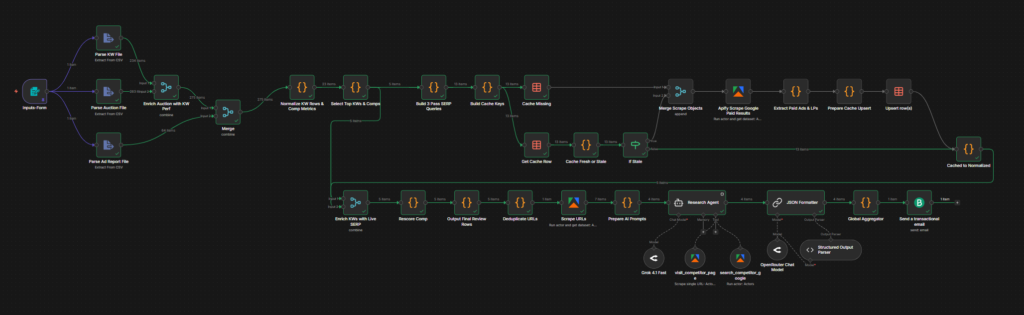
The workflow has 6 main stages:
1. The Trigger (Data Ingestion)
I use the n8n Form Trigger node. It allows me to drag-and-drop my CSVs directly.
- Why: It’s simpler than setting up an API OAuth connection to Google Ads for a v1.
- What it does: Parses the CSVs and merges them into a single JSON object per keyword.
2. The Filter (Threat Detection)
We can’t analyze every competitor. It costs too much and creates too much noise. I implemented a logic layer that scores competitors based on:
- Overlap Rate: How often are they showing up against us?
- Impression Share: Are they beating us?
- Logic: If
Threat Score > Threshold, they get sent to the scraper.
3. The Scout (Apify Google Search)
This is the workhorse. We send our top keywords to the Apify Google Search Results Scraper.
- Configuration: Set to “Search Network” and ensure “Extract Paid Ads” is TRUE.
- Output: This gives us the exact Ad Headlines and Descriptions appearing right now in your target location.
4. The Extractor (Landing Page Scraper)
The ad copy is only half the story. We need to see where they are sending traffic.
- Step: The workflow takes the
Final URLfrom the ad, visits the page, and strips out all the HTML/CSS/Images, leaving just the raw text content. - Why: AI doesn’t need to “see” the website design (yet) to understand the value proposition. Text is enough.
5. The Analyst (The AI Agent)
This is where the magic happens. We package all the data into a structured prompt.
Prompt Concept: “You are a PPC Expert.
Context: We are bidding on keyword [X].
Competitor A is using Headline [Y] and sending traffic to Landing Page [Z].
Analyze: What is their primary Value Prop? What offer are they using? How does it compare to ours?”
6. The Reporter (Email)
Finally, it aggregates the analysis and sends a clean HTML email breakdown. No logging into dashboards needed.
Want to try it yourself? Download the workflow from the GitHub repo.
The Result
Is it perfect? No. Does it work? Kinda. Is the output good? Yes.
The report I get now gives me insights I would have missed. It tells me, “Hey, Competitor X is using ‘Free Shipping’ in their H1, while you bury it in the footer.” or “Competitor Y is targeting this keyword with a dedicated landing page, while you are using a generic homepage.”
Most importantly, I learned that Agentic Workflows are the future of high-value tasks.
Why I’m Sharing This (AgentBlacksmith)
My goal this year is to Build, Execute, and Share.
I’m starting AgentBlacksmith to document this journey of building real, useful AI agents. No fluff, just building.
If you work in marketing or just love building stuff, I’d love for you to try this.
- Is this useful?
- What would you add? (I’m thinking Screenshots & OCR next)
- Do you want the JSON file for this workflow?
Let me know in the comments or reach out to me on agent [at] agentblacksmith.com
Let’s build cool sh*t.
Leave a Reply